Books

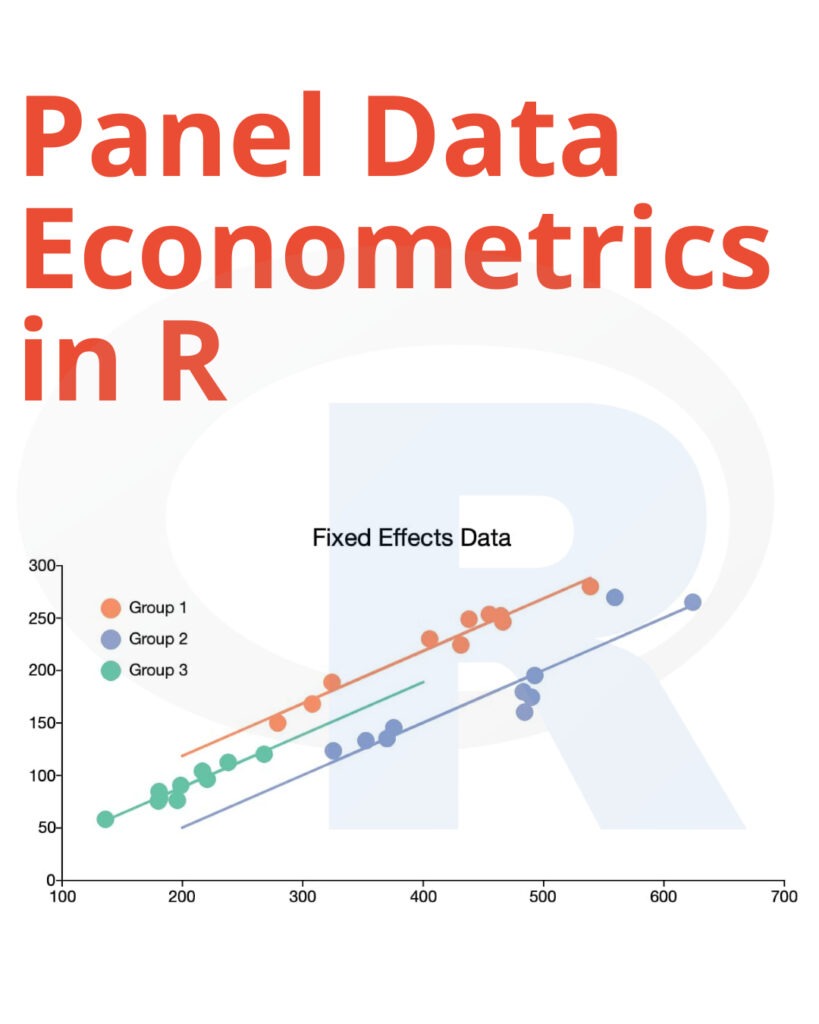
Panel Data Econometrics in R: The plm Package

In the world of econometrics, the analysis of panel data has become increasingly important. Panel data, also known as longitudinal data, involves observations of multiple entities over time. This type of data provides valuable insights into economic and social phenomena, making it a fundamental component of econometric research. In this article, we will explore the powerful “plm” package in R, which is a versatile tool for panel data econometrics.

Understanding Panel Data

Before delving into the “plm” package, it’s essential to grasp the concept of panel data. Panel data combines cross-sectional and time series data, enabling researchers to examine changes within individual entities over a period. The two main dimensions in panel data are:

Cross-sectional dimension (individuals or entities)

This dimension represents different entities such as companies, countries, or individuals. Each entity is observed over multiple time periods, creating a panel structure.

Time series dimension

The time series dimension comprises the various time points or periods when data is collected. It could be monthly, quarterly, yearly, or any other suitable interval.

Panel Data Econometrics in R

The plm Package: An Overview

Now that we understand panel data, let’s explore the “plm” package in R. This package is a powerful toolkit for panel data econometrics, offering a wide range of functionalities for data manipulation and analysis. Here are some key features:

1. Data Import and Transformation

The “plm” package provides functions for importing panel data and transforming it into a suitable format for analysis. Users can easily load data from CSV files or other sources, making it convenient for researchers dealing with diverse data sets.

2. Fixed Effects and Random Effects Models

One of the primary tasks in panel data analysis is modeling entity-specific effects. The “plm” package allows researchers to estimate fixed effects and random effects models, which are crucial for understanding the impact of individual entities on the dependent variable.

3. Robust Standard Errors

Robust standard errors are essential in panel data econometrics to account for heteroscedasticity and correlation in the data. The “plm” package offers robust standard error estimation, ensuring the reliability of the results.

4. First-Differencing and Within-Transformation

Researchers often need to differentiate or transform their data to eliminate unobserved heterogeneity. The “plm” package provides functions for first-differencing and within-transformation, simplifying these processes.

5. Hypothesis Testing

With the “plm” package, you can easily perform hypothesis tests on your panel data models. Whether you want to test the significance of coefficients or assess model fit, this package has you covered.

Getting Started with plm

To get started with the “plm” package, follow these steps:

Step 1: Installation

If you haven’t already installed the package, you can do so using the following command:

install.packages("plm")

Step 2: Loading the Package

After installation, load the package using:

library(plm)

Step 3: Importing Your Data

Use the appropriate functions to import your panel data into R.

Step 4: Model Estimation

Estimate your panel data models, whether it’s fixed effects, random effects, or other specifications, using the “plm” functions.

Conclusion

The “plm” package in R is a valuable resource for researchers and data analysts working with panel data econometrics. Its user-friendly functions and comprehensive capabilities make it an essential tool for understanding economic and social phenomena over time.

Incorporating panel data analysis into your research can provide deeper insights and improve the robustness of your econometric models. So, dive into the world of panel data econometrics with the “plm” package and unlock new dimensions of understanding in your data.

FAQs

  1. What is panel data econometrics? Panel data econometrics is a branch of econometrics that deals with data collected over time on multiple entities, allowing researchers to analyze both cross-sectional and time series variations.
  2. What are fixed effects and random effects models? Fixed effects models account for entity-specific effects, while random effects models capture unobserved heterogeneity in the data.
  3. Why is robust standard error estimation important in panel data analysis? Robust standard errors help correct for heteroscedasticity and correlation in the data, ensuring the validity of statistical tests.
  4. Can I use the “plm” package for other types of data analysis? While “plm” is primarily designed for panel data econometrics, it can also be used for other types of data analysis, depending on your research needs.
  5. Are there any tutorials or resources for learning more about the “plm” package? Yes, there are several online tutorials and documentation resources available to help you master the “plm” package in R.

Download(PDF)

Download: Learn Data Manipulation In R

Analyzing Linguistic Data A practical introduction to statistics using R

Welcome to the world of data analysis! In this comprehensive guide, we’ll take you on a journey through the fascinating realm of Analyzing Linguistic Data using R. Whether you’re a seasoned statistician or a beginner looking to dive into data analysis, this article has something for everyone. We’ll explore the fundamentals, delve into techniques, and provide insights that will help you master the art of linguistic data analysis.

Understanding Linguistic Data

Linguistic data analysis involves examining language-related information to extract valuable insights. This data can come from various sources, such as text documents, transcripts, or social media posts. By applying statistical techniques using R, you can uncover patterns, trends, and correlations within linguistic data.

The Power of R in Linguistic Data Analysis

R is a versatile and powerful programming language for statistical analysis. Its extensive library of packages makes it an ideal choice for linguistic data analysis. Here, we’ll explore some of the key reasons why R is the preferred tool for this task.

Analyzing Linguistic Data A practical introduction to statistics using R

Key Features of R for Linguistic Data Analysis

  1. Open-Source: R is freely available, making it accessible to all.
  2. Rich Graphical Capabilities: Create insightful visualizations to represent linguistic data.
  3. Statistical Packages: R boasts numerous packages specifically designed for linguistic analysis.
  4. Community Support: Join a thriving community of R users and access a wealth of knowledge.
  5. Data Manipulation: Easily manipulate linguistic data to suit your analysis needs.

Getting Started with R

Before we dive into linguistic data analysis, let’s ensure you’re comfortable with R. If you’re new to the language, don’t worry; we’ll guide you through the basics.

Analyzing Linguistic Data: A Practical Introduction to Statistics Using R

Now, let’s roll up our sleeves and start Analyzing Linguistic Data using R. We’ll cover a step-by-step process to help you navigate this fascinating journey.

Step 1: Data Collection

The first crucial step is gathering linguistic data. Identify your data sources and ensure data quality.

Step 2: Data Preprocessing

Clean and prepare your data. This step is essential for accurate analysis.

Step 3: Exploratory Data Analysis (EDA)

Explore your linguistic data using descriptive statistics and visualizations.

Step 4: Statistical Analysis

Apply statistical techniques such as regression, clustering, and hypothesis testing to gain insights.

Step 5: Interpretation and Insights

Interpret your findings and draw meaningful conclusions from linguistic data.

Step 6: Reporting and Visualization

Present your results effectively through reports and visualizations.

Frequently Asked Questions (FAQs)

Q: How can I access R for linguistic data analysis? A: You can download R for free from the official website (insert link). Additionally, there are various online resources and tutorials to help you get started.

Q: Is linguistic data analysis suitable for beginners? A: Yes, this article provides a practical introduction suitable for both beginners and experienced analysts.

Q: Can you recommend any R packages for linguistic data analysis? A: Certainly! Some popular packages include tm, quanteda, and NLP.

Q: Are there any online communities for R users interested in linguistic data analysis? A: Yes, you can join forums and communities like Stack Overflow and Cross Validated to connect with fellow R enthusiasts.

Q: What types of linguistic data can I analyze with R? A: R can analyze a wide range of linguistic data, including text documents, transcripts, social media posts, and more.

Q: How can I improve my skills in linguistic data analysis? A: Practice, explore different datasets, and keep learning from online courses and tutorials.

Conclusion

Analyzing Linguistic Data using R opens up a world of possibilities. With the right techniques and tools, you can unlock valuable insights from linguistic data, enhancing your decision-making and research capabilities. Embrace the power of R and embark on your journey to becoming a linguistic data analysis expert.

Download (PDF)

Download: A Handbook of Statistical Analyses Using R

Forecasting: Principles And Practice Using R

In today’s data-driven world, forecasting plays a pivotal role in making informed decisions. The ability to predict future trends, demands, and outcomes is crucial for individuals and businesses. In this comprehensive guide, we will delve into the principles and practice of forecasting using the powerful tool, R.

Introduction

Forecasting using R is not just a skill; it’s a strategic advantage. With the right techniques and tools, you can harness the power of data to make accurate predictions, whether it’s for financial planning, inventory management, or sales projections. This article will take you on a journey through the world of forecasting, equipping you with the knowledge and expertise to become a forecasting pro.

Understanding Forecasting: Principles And Practice Using R

Forecasting is the process of making predictions based on historical data and statistical models. R, a programming language and software environment for statistical computing and graphics, is widely used in the field of forecasting due to its versatility and extensive libraries.

Forecasting Principles And Practice Using R

Why Forecasting Matters

Forecasting is not just about making educated guesses; it’s about using data to make precise predictions. Here’s why it’s essential:

  1. Informed Decision-Making: Forecasting helps organizations make informed decisions by providing insights into future trends.
  2. Resource Optimization: It allows businesses to optimize resources, whether it’s managing inventory or allocating budgets.
  3. Risk Management: Understanding potential future scenarios enables better risk management.

Key Steps in Forecasting

To excel in forecasting using R, you need to follow a structured approach:

Data Collection and Preparation

Before you start forecasting, you must gather and clean your data. This step is crucial because the accuracy of your predictions depends on the quality of your data.

Model Selection

R offers various forecasting models, such as ARIMA, Exponential Smoothing, and Prophet. Choosing the right model depends on the nature of your data and the problem you’re trying to solve.

Model Training

Once you’ve selected a model, you’ll need to train it on historical data to learn patterns and trends.

Evaluation and Validation

After training, it’s essential to evaluate your model’s performance using validation techniques.

Forecasting and Visualization

Finally, you can use your trained model to make future predictions and visualize the results.

FAQs

How can I learn R for forecasting?

Learning R for forecasting can be done through online courses, tutorials, and books. Some excellent resources include Coursera’s “Practical Time Series Analysis” and the book “Forecasting: Principles and Practice” by Rob J Hyndman and George Athanasopoulos.

Are there any free resources for forecasting using R?

Yes, there are several free resources available. You can access R’s official documentation and tutorials on websites like R-bloggers and Stack Overflow. Additionally, many universities offer free online courses on R and forecasting.

Can R handle large datasets for forecasting?

Yes, R can handle large datasets, but it may require efficient coding and memory management techniques. You can also consider using packages like ‘bigmemory’ and ‘ff’ to work with large datasets in R.

What industries benefit from forecasting using R?

Forecasting using R is valuable across various industries, including finance, retail, healthcare, and manufacturing. It helps businesses make data-driven decisions and optimize their operations.

How can I ensure the accuracy of my forecasts?

To improve forecast accuracy, ensure your data is clean and choose the most suitable forecasting model. Regularly update and retrain your models as new data becomes available.

Are there any online communities for R and forecasting enthusiasts?

Yes, there are vibrant online communities and forums where R and forecasting enthusiasts share knowledge and experiences. Websites like Cross Validated and RStudio Community are great places to connect with experts and learners.

Conclusion

Forecasting: Principles and Practice using R empowers you to unlock the potential of data-driven predictions. Understanding the principles and following best practices allows you to make informed decisions, optimize resources, and thrive in an ever-changing world. Dive into the world of forecasting with R and gain a competitive edge in your field.

Download (PDF)

Download: R for Data Analysis in easy steps: R Programming Essentials

How To Code in Python 3

Welcome to the world of Python 3 programming! Whether you’re a beginner looking to dip your toes into coding or an experienced programmer venturing into Python, this guide will provide you with valuable insights, tips, and step-by-step instructions. In this article, we’ll explore the fundamentals of coding in Python 3, cover essential topics, and address common questions that may arise during your Python journey.

1. Getting Started with Python 3

Python is a versatile and beginner-friendly programming language. Let’s kick off our Python journey with the basics:

What is Python 3?

Python 3 is the latest version of Python, a high-level programming language known for its simplicity and readability. It’s widely used in web development, data analysis, artificial intelligence, and more.

Installing Python 3

To begin coding in Python 3, you need to install it on your computer. Visit the official Python website (link) and follow the installation instructions for your operating system.

Your First Python Program

Let’s write a simple “Hello, World!” program in Python to get started:

print("Hello, World!")
How To Code in Python 3

2. Python Syntax and Basics

Understanding the syntax and basics of Python is crucial. Let’s delve deeper:

Variables and Data Types

In Python, variables are used to store data. Common data types include integers, floats, strings, and booleans.

Control Flow

Learn about if statements, loops, and conditional statements to control the flow of your Python program.

Functions

Functions allow you to organize your code into reusable blocks. We’ll explore how to define and use functions effectively.

3. How To Code in Python 3

Let’s focus on the central topic:

Python Coding Best Practices

To write clean and maintainable Python code, follow these best practices. They include using meaningful variable names, proper indentation, and commenting on your code.

Debugging in Python

Discover techniques and tools for debugging your Python programs. We’ll cover common debugging issues and how to fix them.

4. Python Libraries and Frameworks

Python’s extensive library ecosystem makes it a powerful language. Here are some essential libraries and frameworks:

NumPy and pandas

For data manipulation and analysis, NumPy and pandas are indispensable. Learn how to use them effectively.

Django and Flask

If you’re interested in web development, Django and Flask are popular frameworks. We’ll introduce you to their basics.

5. FAQs about Python 3

Is Python 3 Hard to Learn?

Python’s simplicity makes it beginner-friendly. With dedication and practice, anyone can learn it.

What Can I Build with Python 3?

Python is incredibly versatile. You can create websites, build games, perform data analysis, and even work on machine learning projects.

How Do I Stay Updated with Python?

Python’s community is active. Follow Python-related blogs, forums, and attend meetups or conferences to stay updated.

Are There Job Opportunities for Python Developers?

Yes, Python developers are in high demand. Many companies look for Python expertise, especially in data science and web development.

How Do I Handle Python Errors?

Understanding error messages is key. Python provides descriptive error messages to help you identify and resolve issues.

What Are Some Advanced Python Topics?

Once you’ve mastered the basics, explore advanced topics like decorators, generators, and metaclasses to become a Python expert.

Conclusion

Congratulations! You’ve taken your first steps in learning how to code in Python 3. Python’s versatility and ease of use make it a valuable skill in today’s tech-driven world. Remember, practice is key to mastering Python, so keep coding and exploring new projects.

Download (PDF)

Download: Mastering Python Tricks for Efficient Coding

A Handbook of Statistical Analyses Using R

A Handbook of Statistical Analyses Using R: In data analysis, the R programming language has emerged as a powerful tool. Whether you’re a seasoned data scientist or a beginner taking your first steps into statistical analysis, R offers a versatile and user-friendly platform to work with data. This article will serve as your comprehensive guide, a handbook of sorts, to navigate the world of statistical analyses using R. Let’s dive in!

Getting Started with R

Before we delve into the intricacies of statistical analyses, let’s get familiar with R. In this chapter, we’ll cover the basics of installing R, setting up your environment, and understanding the RStudio interface.

Data Import and Manipulation

The foundation of any data analysis is the data itself. In this chapter, we’ll explore how to import data into R, clean and preprocess it, and perform basic data manipulations.

Descriptive Statistics

Descriptive statistics help us understand and summarize our data. Here, we’ll discuss how to calculate measures like mean, median, and standard deviation, and create visual representations such as histograms and box plots.

A Handbook of Statistical Analyses Using R

Inferential Statistics

Moving beyond descriptive statistics, we’ll dive into inferential statistics. Learn how to perform hypothesis tests, conduct t-tests, chi-squared tests, and more to draw meaningful conclusions from your data.

Regression Analysis

Regression analysis is a powerful tool for understanding relationships between variables. We’ll cover linear regression, logistic regression, and how to interpret regression results in R.

Data Visualization with ggplot2

Data visualization is crucial for conveying insights effectively. We’ll explore the ggplot2 package, a popular choice for creating stunning and informative visualizations.

Time Series Analysis

Time series data is everywhere, from stock prices to weather patterns. This chapter will teach us how to work with time series data, perform forecasting, and seasonal decomposition.

Machine Learning with R

R offers a wide array of machine-learning algorithms. We’ll introduce you to machine learning basics and guide you through building predictive models.

Advanced Topics

This chapter covers advanced statistical techniques, including ANOVA, factor analysis, and survival analysis, expanding your statistical toolkit.

R Packages and Resources

Discover a treasure trove of R packages and online resources to enhance your statistical analysis skills.

Conclusion

Congratulations! You’ve now embarked on a journey through the world of statistical analyses using R. This handbook has equipped you with the knowledge to handle data, perform a wide range of statistical tests, create impactful visualizations, and even dive into the exciting field of machine learning. Keep practicing, and you’ll master the art of data analysis with R in no time.

FAQs

1. Is R suitable for beginners in data analysis?

Absolutely! R is known for its user-friendly interface and robust community support, making it an excellent choice for beginners.

2. Where can I find datasets to practice within R?

You can find datasets on platforms like Kaggle, the UCI Machine Learning Repository, and even within R packages.

3. Are there any alternatives to ggplot2 for data visualization in R?

Yes, alternatives like lattice and base graphics exist, but ggplot2 is widely preferred for its versatility and aesthetics.

4. How can I speed up my R code for large datasets?

Using optimized functions and packages like data.table can significantly improve the performance of your R code.

5. Where can I seek help if I encounter problems in R?

You can join online communities like Stack Overflow or explore R’s extensive documentation and forums for assistance with R-related issues.

Download (PDF)

Download: Introduction, Statistics, and Data Analysis in R

Data Visualization and Exploration with R

Data visualization and exploration are essential components of the data analysis process. They allow us to understand and communicate the patterns, trends, and insights present in our data. R is a popular programming language for data analysis and visualization, and it provides a wide range of tools and packages for these tasks.

In this practical guide, we will explore the use of R, RStudio, and Tidyverse for data visualization and exploration. Tidyverse is a collection of packages for data manipulation and visualization, which provides a consistent and intuitive syntax for working with data.

Data Visualization and Exploration with R

Here are some of the topics we will cover in this guide:

  1. Data Import and Cleaning: We will start by importing data into R and cleaning it using the Tidyverse package. We will explore functions such as read_csv(), filter(), select(), and mutate().
  2. Data Visualization with ggplot2: ggplot2 is a powerful data visualization package in R. We will explore how to create a variety of visualizations, such as scatterplots, bar charts, line charts, and heatmaps, using ggplot2.
  3. Exploring Data with Dplyr: Dplyr is another Tidyverse package that provides functions for data exploration and manipulation. We will explore how to use dplyr functions such as group_by(), summarize(), and arrange() to explore our data.
  4. Interactive Visualization with Shiny: Shiny is an R package that allows you to create interactive web applications for data visualization. We will explore how to create a simple Shiny application to visualize our data.
  5. Geospatial Visualization with Leaflet: Leaflet is an R package that allows you to create interactive maps for data visualization. We will explore how to use Leaflet to create a map visualization of our data.

Throughout this guide, we will use real-world datasets to demonstrate how to apply these techniques to solve data analysis problems. By the end of this guide, you will have a solid understanding of how to use R, RStudio, and Tidyverse for data visualization and exploration.

Free E-Book:

Introduction Statistics And Data Analysis in R

Introduction, Statistics and Data Analysis in R: In the age of information, data is the driving force behind decision-making in various fields, from business to healthcare, and beyond. Understanding data and drawing meaningful insights from it has become paramount. This article will delve into the world of statistics and data analysis using R, a powerful and versatile programming language.

The Importance of Data Analysis

Data analysis is the process of inspecting, cleaning, transforming, and modeling data to discover useful information, draw conclusions, and support decision-making. In today’s data-driven world, organizations rely on data analysis to gain a competitive edge. It helps in identifying trends, making predictions, and solving complex problems.

Getting Started with R

R is an open-source programming language and environment specifically designed for statistical computing and graphics. It offers a wide range of packages and libraries that make data analysis efficient and accessible. To get started, you’ll need to install R on your computer and perhaps a user-friendly integrated development environment like RStudio.

Introduction Statistics And Data Analysis in R
Introduction, Statistics, And Data Analysis in R

Basic Data Manipulation

Before diving into analysis, you need to manipulate your data. R provides tools for data cleaning, transformation, and merging datasets. You’ll learn how to handle missing values, filter data, and create new variables.

Exploratory Data Analysis

Exploratory Data Analysis (EDA) is the first step in analyzing data. It involves generating summaries and visualizations to understand the underlying patterns and relationships in your dataset. R makes EDA easy with packages like ggplot2 and dplyr.

Data Visualization

Data visualization is a crucial aspect of data analysis. R offers a plethora of visualization options, from simple scatter plots to complex heatmaps. You’ll explore how to create compelling visualizations to communicate your findings effectively.

Statistical Analysis in R

R is a powerhouse when it comes to statistical analysis. You’ll learn how to perform common statistical tests, such as t-tests and ANOVA, to make inferences about your data. R also supports regression analysis, time series analysis, and more.

Advanced Techniques

For more complex analyses, R provides advanced techniques and machine learning algorithms. You can delve into topics like clustering, classification, and deep learning using packages like caret and keras.

Real-World Applications

To bring everything together, we’ll showcase real-world applications of R in various domains. From predicting stock prices to diagnosing diseases, R has a wide range of practical uses.

Conclusion

In conclusion, statistics and data analysis in R open doors to a world of possibilities. Whether you’re a data enthusiast, a researcher, or a business professional, mastering R can empower you to make informed decisions based on data-driven insights.

Frequently Asked Questions

  1. Is R difficult to learn for beginners?
    • While R has a learning curve, it’s beginner-friendly with a supportive community and extensive documentation.
  2. Can I use R for big data analysis?
    • Yes, R can handle big data through packages like ‘dplyr’ and ‘data.table.’
  3. What are some popular R packages for data analysis?
    • Popular packages include ‘ggplot2’ for visualization, ‘dplyr’ for data manipulation, and ‘caret’ for machine learning.
  4. Is R suitable for business analytics?
    • Absolutely! R is widely used in business analytics for forecasting, market segmentation, and customer analytics.
  5. Where can I find datasets to practice with R?
    • You can find datasets on websites like Kaggle, UCI Machine Learning Repository, and data.gov.

Download(PDF)

Download: Regression models for data science in R

Think Bayes: Bayesian Statistics In Python

Welcome to a journey through the fascinating realm of Bayesian statistics in Python, where we unravel the power of probabilistic programming using Think Bayes. In this comprehensive guide, we’ll explore the ins and outs of Bayesian statistics, providing you with valuable insights, expert knowledge, and answers to frequently asked questions (FAQs). Whether you’re a novice or an experienced data scientist, this article will equip you with the skills and understanding needed to harness the full potential of Think Bayes.

1. Understanding Bayesian Statistics

Bayesian statistics is a statistical approach that allows us to update our beliefs about a hypothesis as new evidence becomes available. It’s a powerful tool in data science and offers a robust framework for making predictions and decisions.

2. Why Python for Bayesian Statistics?

Python is a popular choice for Bayesian statistics due to its simplicity and a wealth of libraries like Think Bayes that make implementing Bayesian models a breeze.

Think Bayes Bayesian Statistics In Python

3. Getting Started with Think Bayes

Let’s dive right into Think Bayes and understand how to install and set up this incredible Python library for Bayesian analysis.

4. Basic Probability Theory

Before delving deeper into Think Bayes, it’s crucial to have a solid grasp of basic probability theory. We’ll cover essential concepts that will lay the foundation for Bayesian statistics.

5. Bayesian Inference

Discover the heart of Bayesian statistics – Bayesian inference. Learn how to make inferences about unknown parameters using probability distributions.

6. Bayes’ Theorem Demystified

Unravel the mysteries of Bayes’ theorem, a fundamental concept in Bayesian statistics. We’ll break it down into simple terms for better comprehension.

7. Prior and Posterior Distributions

Explore the significance of prior and posterior distributions in Bayesian analysis and how they impact decision-making.

8. Bayesian Modeling

Take your Bayesian skills to the next level by delving into Bayesian modeling techniques and applications.

9. Think Bayes in Action

Let’s put theory into practice. We’ll work through real-world examples using Think Bayes to solve complex problems.

10. Evaluating Model Performance

Learn how to assess the performance of Bayesian models and make data-driven decisions based on the results.

11. Think Bayes vs. Other Libraries

Compare Think Bayes with other Python libraries used for Bayesian analysis, highlighting its unique advantages.

12. Advanced Topics in Bayesian Statistics

Delve into advanced topics such as hierarchical modeling, Markov Chain Monte Carlo (MCMC) methods, and Bayesian networks.

13. Common Mistakes in Bayesian Analysis

Avoid pitfalls in Bayesian analysis by learning about common mistakes and how to steer clear of them.

14. FAQs

What Is the Key Advantage of Bayesian Statistics in Python?

Bayesian statistics in Python offers a flexible and intuitive approach to handling uncertainty in data, making it a powerful tool for data analysis and decision-making.

Can I Use Think Bayes for Machine Learning?

Yes, Think Bayes can be integrated into machine learning pipelines for tasks like classification and regression.

Is Bayesian Analysis Only for Advanced Data Scientists?

No, Bayesian analysis can be learned by beginners too, thanks to user-friendly libraries like Think Bayes.

How Do I Choose Priors in Bayesian Analysis?

Selecting appropriate priors is a critical step in Bayesian analysis. We’ll provide guidance on making informed choices.

Are There Any Limitations to Bayesian Statistics?

While Bayesian statistics is powerful, it’s not a one-size-fits-all solution. We’ll discuss its limitations and when other methods may be more suitable.

Can You Recommend Resources for Further Learning?

Absolutely! We’ll share valuable resources and references to help you deepen your understanding of Bayesian statistics in Python.

Conclusion

In this comprehensive guide, we’ve embarked on a journey through the world of Bayesian statistics in Python using Think Bayes. We’ve covered essential topics, provided real-world insights, and answered common questions. Whether you’re a data science enthusiast or a seasoned professional, you now have the knowledge and tools to harness the power of Bayesian statistics in Python.

Don’t miss the opportunity to explore the endless possibilities that Think Bayes offers in the realm of data analysis. Start your Bayesian journey today!

Download (PDF)

Download: Bayesian modeling and computation in python

Just Enough R: Learn Data Analysis with R in a Day

Welcome to the world of data analysis! In this article, we’ll dive into the exciting realm of data analysis using R, a powerful programming language for statistical computing and graphics. If you’re looking to become proficient in data analysis quickly, you’re in the right place. Just Enough R: Learn Data Analysis with R in a Day will equip you with the essential skills to harness the potential of data. Let’s embark on this data-driven journey together.

2. Understanding Data Analysis

Data analysis is the process of inspecting, cleaning, transforming, and modeling data to discover valuable insights, draw conclusions, and support decision-making. With R, you can perform these tasks efficiently and effectively.

3. Why Choose R for Data Analysis?

R is a preferred choice among data analysts for several reasons:

  • Open Source: R is free to use and has a vast community of users and developers.
  • Versatility: It can handle a wide range of data types and formats.
  • Rich Libraries: R offers numerous libraries and packages for data manipulation and visualization.
  • Statistical Power: R excels in statistical analysis, making it a favorite in research and academia.
Just Enough R Learn Data Analysis with R in a Day
Just Enough R: Learn Data Analysis with R in a Day

Download:

4. Getting Started with R

Before diving into data analysis, you need to get comfortable with R. Here’s how to start:

  • Installation: Download and install R from the official website.
  • RStudio: Consider using RStudio, a user-friendly integrated development environment (IDE) for R.
  • Basics: Familiarize yourself with R’s syntax, variables, and data structures.

5. Loading and Manipulating Data

To analyze data, you must first load it into R. Here’s how:

  • Import Data: Use functions like read.csv() or read.xlsx() to import data from various sources.
  • Data Cleaning: Remove duplicates, handle missing values, and ensure data consistency.

6. Exploratory Data Analysis (EDA)

EDA is a crucial step in data analysis. It involves:

  • Descriptive Statistics: Calculate basic statistics like mean, median, and standard deviation.
  • Data Visualization: Create insightful plots and charts to explore data patterns.

7. Statistical Analysis

R’s statistical capabilities are unmatched. You can perform:

  • Hypothesis Testing: Determine if there’s a significant difference between groups.
  • Regression Analysis: Predict outcomes based on variables.
  • Clustering and Classification: Group data points based on similarities.

8. Data Visualization

Visualizing data is essential for conveying insights effectively. R offers a variety of packages, including ggplot2, for creating stunning visualizations.

9. Machine Learning with R

Take your data analysis skills to the next level by diving into machine learning. R provides libraries like caret and randomForest for predictive modeling.

10. Just Enough R: Learn Data Analysis with R in a Day

This section delves into the core content of this article. We’ll cover the following topics in detail:

Getting Started

  • Installing R: A step-by-step guide to installing R on your system.
  • RStudio Setup: Configure RStudio for a seamless data analysis experience.
  • Basic R Commands: Learn essential commands to navigate R.

Data Import and Cleaning

  • Loading Data: Import data from various sources and formats.
  • Data Cleaning Techniques: Master data cleaning to prepare for analysis.

Exploratory Data Analysis

  • Descriptive Statistics: Understand the basics of data summary.
  • Data Visualization: Create informative visualizations using ggplot2.

Statistical Analysis

  • Hypothesis Testing: Learn how to test hypotheses with R.
  • Regression Analysis: Understand regression modeling.

Data Visualization

  • ggplot2 Essentials: Dive deep into ggplot2 for stunning visualizations.

Machine Learning

  • Introduction to Machine Learning: Explore the fundamentals.
  • Predictive Modeling: Build predictive models using R libraries.

11. Frequently Asked Questions (FAQs)

Here are some common questions about learning data analysis with R:

  • How long does it take to learn data analysis with R?
  • Can I use R for big data analysis?
  • Are there any prerequisites for learning R?
  • What are the career prospects for data analysts proficient in R?
  • Is R difficult to learn for beginners?
  • Where can I find datasets to practice data analysis with R?

12. Conclusion

Just Enough R: Learn Data Analysis with R in a Day provides a comprehensive and accessible way to become proficient in data analysis using R. Whether you’re a beginner or looking to expand your skillset, this guide equips you with the knowledge and tools to succeed in the world of data analysis. Start your journey today and unlock the power of data.

Download(PDF)

Download: R for Data Analysis in easy steps: R Programming Essentials

An Introduction to Financial Data Analysis with R

An Introduction to Financial Data Analysis with R: Financial data analysis is an important part of any financial decision-making process. With the rise of big data and advanced analytics, the ability to analyze financial data has become crucial for businesses, governments, and other organizations. R provides a powerful platform for financial data analysis. Whether working with time series data, regression analysis, or machine learning. With the right data and the right tools, you can make informed financial decisions based on your data analysis. In this article, we will cover the basics of financial data analysis in R and provide some practical examples with real data.

An Introduction to Financial Data Analysis with R

Getting Started with R

To get started with R, you will need to download and install the software. You can download R from the official website. Once you have installed R, you can use the software to analyze financial data.

The first step in financial data analysis is to import the data into R. R provides several functions for importing data, including read.csv and read.table. For example, to import a CSV file into R, you can use the following code:

financial_data <- read.csv("financial_data.csv")

Once you have imported the data into R, you can start exploring the data using various R functions. For example, you can use the head function to see the first few rows of the data:

head(financial_data)

Exploring Financial Data in R

Once you have imported the data into R, you can start exploring the data. The first step in this process is to get a sense of the overall structure of the data. You can use the str function to see the structure of the data:

str(financial_data) 

Next, you can use the summary function to see a summary of the data:

summary(financial_data)

The summary function will give you information about the mean, median, and standard deviation of the data.

Data Visualization in R

Data visualization is an important part of financial data analysis. R provides many functions for visualizing data, including histograms, scatter plots, and line charts.

For example, you can use the hist function to create a histogram of the data:

hist(financial_data$returns)

You can also use the plot function to create a scatter plot of the data:

plot(financial_data$returns, financial_data$price)

Financial Data Analysis with R

Once you have explored the data and visualized the data, you can start analyzing the data. There are many techniques for financial data analysis, including regression analysis, time series analysis, and machine learning.

For example, you can use the lm function to perform a linear regression analysis:

model <- lm(returns ~ price, data = financial_data)
summary(model)

You can also use the arima function to perform a time series analysis:

model <- arima(financial_data$returns, order = c(1, 1, 0))
summary(model)

Download(PDF)